
 |  |  |  |  |  |  |  |  |

 |
 |
 |
 |
 |
 |
 |
 |
 |
 |
 |
 |
 |
 |
 |
 |
 |

|
Addon Domains
How To Setup Additional Domains On Your Account
|
|
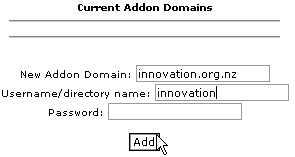
An addon domain is a domain name that that points to a subdirectory within your account.
Addon domains must be registered domain names that you own and configured to point to
our domain name servers.
To add a domain to your web site:
Important!
Remember to change the name server information that is currently on your
domain's registration record so that it is pointing at our servers using the information that you
see below. Primary Name Server:
NS7.SITE-FUEL.COM |
|
|
Hosting Plan Hosting Features Sales FAQ Control Panel Demo Why Us Hosting Facility
Testimonials Sign Up Support Contact Us AUP Terms Privacy Resources Trade Link
|
|
Copyright © 2003-2004 2ClickHere.com All rights reserved